.png)
Developers in 2026 aren’t short of blockchain networks to choose from: Bitcoin, Ethereum, Solana, to name a few of the most popular. Most blockchains emphasize transparency, letting any participant inspect smart contracts and track transactions. While this is an advantage in many contexts, some technical and business requirements make these options unsuitable. In many cases, the privacy of transactions must be preserved. For example, an organization may need to comply with the GDPR and retain the ability to prune data from the ledger. It may also need to execute confidential processes, where transactions must remain hidden from competitors.
Digital Asset’s Canton network addresses these needs: a private, interoperable blockchain designed for data sovereignty, while preserving key decentralization properties.
In this article, we’ll explore Canton, including its architecture, its raison d’être, its recommended smart contract language, Daml, and a quick-start guide to writing your first Daml smart contract on Canton. In the tutorial, we’ll implement a simple bank contract that lets users deposit, withdraw, view their balance, and transfer funds to another user.
This article is aimed at readers who already have some blockchain and programming experience, but not necessarily with Canton or Daml. In particular, although it’s not a requirement to comprehend this article, we assume some familiarity with Ethereum and Solidity.
What is Canton?
Canton is a global distributed ledger and a protocol that allows organizations to control their own data, designed by Digital Asset. It records and synchronizes transactions, ensuring they are ordered and agreed upon in a decentralized way. It consists of a collection of synchronization domains connected to participant nodes.
Data is subject to the laws of the jurisdiction in which it is collected, and Canton allows companies to retain sovereignty over the data they produce. This supports compliance and enables privacy. Data is shared on a need-to-know basis: it may be shared broadly, or kept exclusive to a small set of parties explicitly authorized to see it. Organizations can choose where to store data, whether on-premise or in the cloud.
In other words, Canton is optimized for interoperability between domains rather than a “one chain to rule them all” model. Organizations can choose where to host data and selectively decide what to reveal. Contrast this with Ethereum, where EVM smart contracts are public programs running in a single shared execution domain.
On Ethereum, access control is implemented inside contracts (for example, with onlyOwner checks), but the transaction and its effects remain publicly visible. On Canton, access control and visibility are enforced at the protocol level. This makes it a better fit for multi-party workflows such as financial agreements, asset servicing, or trade processing, where different organizations must coordinate on shared processes but cannot (and often legally must not) disclose their full internal state to one another.
Canton preserves the shared truth of a decentralized system while disclosing data only to the parties that need to see it, rather than broadcasting it to every participant.
What is Daml?
Daml is Digital Asset’s smart contract language for the Canton network. Unlike most smart contract languages, Daml follows a purely functional paradigm and uses syntax heavily inspired by Haskell. Daml offers an expressive, strongly-typed type system, allowing the programmer to enforce correctness variants during compile-time.
This contrasts with the mostly imperative style used by languages like TypeScript, Python, Solidity, or Rust. In the purely functional paradigm, functions are referentially transparent: for a given set of inputs, the output is always the same, and no side effects are observable. This is achieved by enforcing immutability and by clearly distinguishing computations from effects. Imperative programs perform computations by using state transitions, and thus many imperative programming languages allow functions to mutate its own arguments or even global state. It’s thus harder to guarantee that a function won’t mutate its arguments, perform unexpected transactions, or trigger I/O and other side effects.
A key benefit of this approach is that programs are easier to reason about. Code tends to be more secure, more correct, and more self-documenting. These properties are valuable for correctness-critical systems, especially in finance. The trade-off is that side-effecting workflows can feel less ergonomic, and the learning curve can be steeper. A common Haskell proverb is: “if it compiles, it works”, reflecting that developers often invest more effort upfront to reduce debugging later, which is a good match for Daml. Although the propaganda is not strictly true, it does make development much safer.
As AI generates more code, static, strongly typed languages like Daml gain an additional advantage. LLM outputs are probabilistic: generated code can look plausible while still containing subtle logical errors. Strong types and compiler-enforced invariants catch many of these issues early, long before code reaches production. Even when AI helps write code faster, a language like Daml helps keep the result within the correctness bar that real-world financial workflows require.
Canton and Daml Concepts
Before we start writing Daml smart contracts, it helps to understand some of Canton’s architectural concepts and how they map to Daml.
Canton is based on an extended UTxO (Unspent Transaction Output) model, similar to blockchains like Cardano. This differs from systems like Ethereum and Solana, which use an account model. In the account model, a user’s balance is tracked as a single value and updated directly by transactions. In a UTxO model, transactions create and consume unspent outputs, where these unspent outputs are contract IDs created in a transaction.
For example, suppose Alice receives 100 tokens in a transaction. In a UTxO system, that typically means she receives a UTxO worth 100 tokens. If Alice later spends 20 tokens in a transaction, the transaction will consume her 100 token UTxO and create a new UTxO worth 80 tokens. Later, if she receives another 50 tokens, she will have two UTxOs worth 80 and 50 tokens. If she now wants to spend 90 tokens, a new transaction will consume both UTxOs and produce a new UTxO worth 40 tokens as change. In other words, the transaction consumes enough inputs to cover the spend and creates an output for the remaining value.
Unlike Ethereum’s account model, which depends on mutable global state, Canton represents state as a set of immutable contracts. As a result, “updating” state works differently: when a choice is exercised, the affected contracts are archived and new replacement contracts are created to reflect the change, similarly to the unspent outputs example above.
When a contract is consumed, its contract ID is spent and removed from the UTxO set. Fetching contracts or exercising non-consuming choices doesn’t spend them. Since the contract data is immutable, the only way to “modify” a contract is to spend a contract ID it and recreate the contract with a new ID.
For more details, you may read about the Ledger Model (Detailed) and UTXO model vs. account Model.
Glossary
Below is a summary of some commonly terms and expressions, sorted alphabetically:
- Active contract: a contract that has not been archived.
- Atomicity: “all or nothing”, meaning that a set of transactions either fully succeed, or completely roll back if any of them fail.
- Choice: an entrypoint into the smart contract, analogous to an Ethereum method.
- Contract archival: marks an existing smart contract as inactive (archived), so it can no longer be used to have choices exercised on it.
- Contract consumption: the same as contract archival.
- Contract creation: creates a smart contract instance from a template and authorizes its choices.
- Contract ID: a way to look up contracts, analogous to an SQL key.
- Controller: the party authorized to exercise a choice.
- Divulgence: automatic disclosure of contract information to non-stakeholders, relevant to privacy discussions.
- Exercise: the act of executing a choice.
- Party: the on-ledger entity, analogous to an address/account.
- Signatories: a set of owners of a smart contract, who can also upgrade it.
- Smart contract: the code that will run in the context of the blockchain, often called just a contract.
- Stakeholder: a party in the contract who receives transaction views, either a signatory or observer.
- Template: the blueprint/definition from which contract instances are created.
- Transaction: the atomic unit of ledger changes.
For a full list of terms, see the Glossary.
Moreover, a Daml contract specifies the visibility of each party into the contract:
- Signatories see anything that happens to the smart contract.
- Choice observers see when a choice is exercised.
- Contract observers see when a smart contract is created and archived.
How to Write Daml Smart Contracts?
Setting up Your Development Environment
For this tutorial, we’ll assume you are using Visual Studio Code. If you don’t have it, you can download it from: code.visualstudio.com.
Alternatively, Neovim users might want to use the plugin: https://github.com/Sengoku11/daml.nvim.
In Visual Studio Code, install the Daml Studio extension: https://marketplace.visualstudio.com/items?itemName=DigitalAssetHoldingsLLC.daml.
You’ll also need Dpm, see: https://docs.canton.network/sdks-tools/cli-tools/dpm.
This tutorial was written using Dpm 1.0.17, build 5ba68d2, and SDK version 3.5.1. You can check your Dpm version with dpm --version and the active SDK version with dpm version --active. If the SDK version doesn’t match, you can run dpm install 3.5.1 to install it.
Daml Vs. Solidity: A Small Comparison
Daml is a functional programming language heavily inspired by Haskell. We won’t go deep into functional programming, but it can help to compare some basics to Solidity. Let’s take a simple Daml file and its Solidity analogue.
For free Haskell tutorials, here are some resources:
- https://www.seas.upenn.edu/~cis1940/spring13/lectures.html
- https://learnyouahaskell.github.io/
- https://learn-haskell.blog/
- https://youtu.be/NzIZzvbplSM
Below you’ll find an example Daml smart contract (replace your main/daml/Main.daml with it) and a Solidity smart contract for comparison. They are not exactly equivalent, but they should work as a starting point.
Daml
The following snippet shows a Daml smart contract and a test script.
Here is main/daml/Main.daml:
module Main where

template HelloDaml
  with
    owner : Party
    message : Text
  where
    signatory owner

    choice UpdateMessage : ContractId HelloDaml
      with
        newMessage : Text
      controller owner
      do
        create this with
          message = newMessage

    nonconsuming choice ViewMessage : Text
      with
        viewer : Party
      controller viewer
      do
        pure message
Here is test/daml/Test.daml:
module Test where

import Main

import Daml.Script

testCanViewMessage : Script ()
testCanViewMessage = script do
  alice <- allocatePartyByHint (PartyIdHint "Alice")
  aliceId <- validateUserId "alice"
  createUser (User aliceId (Some alice)) [CanActAs alice]

  contractId <- submit alice do
    createCmd HelloDaml with
      owner = alice
      message = "Hello, Daml!"

  message <- submit alice do
    exerciseCmd contractId ViewMessage with viewer = alice

  debug message

  assertMsg "Message should be \"Hello, Daml!\"" (message == "Hello, Daml!")
Solidity
The following snippets show a Solidity smart contract and a test script using Forge.
Here is contracts/HelloSolidity.sol:
pragma solidity ^0.8.28;

contract HelloSolidity {
  address private owner;
  string private message;

  constructor(address _owner, string memory _message) {
    owner = _owner;
    message = _message;
  }

  function updateMessage(string memory _newMessage) public {
    require(msg.sender == owner);
    message = _newMessage;
  }

  function viewMessage(address _viewer) public view returns (string memory) {
    require(msg.sender == _viewer);
    return message;
  }
}
Here is test/HelloSolidity.t.sol:
pragma solidity ^0.8.28;

import "forge-std/Test.sol";
import "../src/HelloSolidity.sol";

contract HelloSolidityTest is Test {
  function testCanViewMessage() public {
    address alice = address(0xA11CE);

    vm.prank(alice);
    HelloSolidity contractAddr = new HelloSolidity(alice, "Hello, Solidity!");

    vm.prank(alice);
    string memory message = contractAddr.viewMessage(alice);

    console.log(message);

    assertEq(message, "Hello, Solidity!", "Message should be \"Hello, Solidity!\"");
  }
}
In both versions, there are a few similarities and many differences.
First, the syntax is very different. The Daml version starts with the module declaration (module Main where), which must match the filepath, followed by any import directives. Imports refer to module names rather than files, unlike in Solidity.
A Daml smart contract is defined with the template keyword, while the Solidity equivalent uses contract. Daml uses the off-side rule (indentation as syntax) to define blocks, while Solidity uses braces ({}). Another language you might know that also uses the off-side rule is Python.
Daml uses -- comment and {- comment -} for line and block comments. Solidity uses // comment and /* comment */, respectively.
In Solidity, a function call places its arguments in parentheses and separates them with commas, like fun(arg1, arg2, arg3). Daml separates the function and its arguments with spaces, like fun arg1 arg2 arg3.
In Daml, the contract is declared as template TemplateName with …, while in Solidity it is contract ContractName {…}. After the with keyword, all fields must be declared up front.
Names in Daml are case-sensitive. For example, the template name must begin with an uppercase letter; calling it helloDaml would be a syntax error. Likewise, variables and fields must begin with a lowercase letter, while module names, type names, constructors, and choices must begin with an uppercase letter.
Inside the where block, we can declare signatories, observers, keys, and choices. A choice is roughly analogous to a contract method. Its parameters are declared in a with block, and the implementation is written in a do block. The type after the colon (:, usually read as “has type”) is the choice’s return type. A major difference is the controller declaration, which restricts which parties can exercise the choice. For UpdateMessage, only the owner can exercise the choice, while ViewMessage allows anyone (the viewer, passed as a choice parameter) to exercise it. The Solidity version of viewMessage is not very idiomatic, but it illustrates what is happening.
More precisely, a choice always returns Update t, where t is the indicated type. Omitting Update is syntax sugar. The pure message in ViewMessage wraps message : Text, so pure message : Update Text.
All actions performed within a choice’s do block are atomic, so if any intermediate transaction fails, the entire transaction rolls back, similar to transactions in Ethereum. The <- operator binds a result, unwrapping a value of type t from an Update t. In other words, x <- action means “run action and store its its result in x. However, everything in a do block is still part of the ledger update and must finish by producing an “Update result” (not a plain value), so you generally cannot write a function that takes an action like Update t and turns it into a plain t.
You might have noticed that ViewMessage is declared as a nonconsuming choice, while UpdateMessage is declared as a plain choice. What do these mean? This is a major difference from how the EVM works. In Daml, exercising a choice consumes the contract by default: it archives the contract and prevents further choices from being exercised. In practice, UpdateMessage does four things:
- It implicitly archives the current contract.
this with message = newMessagetakes the current contract (this) and creates a copy withmessagereplaced bynewMessage. We could updateowneras well, if we wanted.- The
create …function creates a new contract using the provided input. - The newly created
ContractId HelloDamlis returned, because it’s the last statement in thedoblock.
There are several ways to declare a choice:
choice(no qualifier): the default, analogue topreconsuming. The contract is archived before the choice body runs, and the controllers and every stakeholder (signatories and observers) see the full consequences of the exercise.preconsuming choice: the contract is archived before the choice runs, similar to justchoice, but the disclosure is narrower: only the controllers and signatories see the full consequences. Other stakeholders, like the observers, only see that the contract was archived, but not what the choice body did. Fetching the contract within its own body can fail in this mode, because the contract has already been archived.postconsuming choice: the contract is archived after the choice runs. The disclosure is the same aspreconsuming choice.create thiscan fail with a unique key violation, because the original contract is archived only after the new contract is created, leading to duplicates.nonconsuming choice: the contract is not archived before or after the choice runs.
In this example, we could have made UpdateMessage a non-consuming choice and explicitly called archive self before creating the new contract, where self refers to the current contract ID. archive self is also equivalent to exercise self Archive, because every contract implicitly has the Archive choice.
Finally, looking at the test file, testCanViewMessage creates a party representing Alice and a user ID with the same name. It then creates a contract instance, views the message (by exercising a choice), prints the message, and asserts that the content matches.
Write Your First Daml Smart Contract: A Bank Contract
Create a Project
With Daml installed, you should have the dpm command available in your terminal. Create a new project by running dpm new daml-bank. daml-bank is the project name, and you can change it if you wish. The command creates a new directory with the same name. Change into it with cd daml-bank, and open it in Visual Studio Code by running dpm studio. You
Inside, you’ll find main/daml/Main.daml containing an example smart contract, along with main/daml.yaml containing the configuration for the main package. test/daml/Test.daml contains a test for the main file, and test/daml.yaml contains the test package configuration. In the project root, multi-package.yaml contains project-wide configuration.
Open main/daml/Main.daml and delete everything inside; we’ll start from scratch. Also open main/daml.yaml and add:
build-options:
  - --target=2.3
Repeat this for test/daml/Test.daml and test/daml.yaml.
For this tutorial, we’ll use contract keys, which are only available with Daml-LF (Daml Ledger Format) version 2.3 and later. You may need to restart your language server for the change to take effect.
First Try: A Naïve Approach
The initial plan is to create a template representing a user’s account, containing the owning party and the current balance, and a choice allowing transfers to be made.
Daml has several built-in numeric types. To represent balances, we’ll use Numeric n, a fixed-point decimal type with up to 38 digits of precision and a scale of n (the number of digits after the decimal point). Since this use case only needs addition and subtraction, using 2 digits is enough. For more complex use cases, you might increase the scale. The Decimal type, for example, is an alias for Numeric 10.
Let’s start with the user account template:
module Main where

type Balance = Numeric 2

template Account
  with
    owner : Party
    balance : Balance
  where
    signatory owner
The owner should be able to deposit, withdraw, view their balance, and transfer funds to another user. We also need to ensure deposits are positive and that withdrawals do not exceed the current balance. The first three are straightforward. Add the following choices:
    choice Deposit : ContractId Account
      with
        amount : Balance
      controller owner
      do
        assertMsg "Non-positive amount" (amount > 0.00)
        create this with
          balance = balance + amount

    choice Withdraw : ContractId Account
      with
        amount : Balance
      controller owner
      do
        assertMsg "Non-positive amount" (amount > 0.00)
        assertMsg "Insufficient balance" (amount <= balance)
        create this with
          balance = balance - amount

    nonconsuming choice ViewBalance : Balance
      controller owner
      do
        pure balance
assertMsg checks that a condition holds and fails with the provided message otherwise. Since exercising a choice archives the contract by default, we recreate the contract with an updated balance.
Still inside the Account template, consider Transfer. A naive solution might start like this:
    choice Transfer : (ContractId Account, ContractId Account)
      with
        receiver : Party
        amount : Balance
      controller owner
      do
        assertMsg "Non-positive amount" (amount > 0.00)
        assertMsg "Insufficient balance" (amount <= balance)

        (other, that) <- _

        thisAccount <- create this with
          balance = balance - amount
        thatAccount <- create that with
          balance = balance + amount

        archive other

        pure (thisAccount, thatAccount)
This recreates both the current account and the receiver account. However, we left a hole (the underscore _): how do we find the receiver account? There are a few options. We could use fetch @TemplateName contractId to read a contract payload, but we don’t know the receiver’s contract ID. We could use fetchByKey @TemplateName key, which returns the contract ID and payload for a key and fails if the key isn’t visible. Or we could use lookupByKey key, which returns None when the key isn’t visible.
So what is a key? Keys act like primary keys in a database: they let you find a contract using a value that is unique per contract. In our case, we could add an explicit account ID field and use that as the key, or assume each party has only one account and use the party as the key. In the template, after signatory owner, add:
     signatory owner

+    key owner : Party
+    maintainer key
+
     choice Deposit : ContractId Account
The maintainer must refer to the key and must be a signatory. If we wanted to key the contract with a numeric ID, for example, with key (owner, id) : (Party, Int), we would have to add maintainer key._1 instead.
Now we can replace the hole _ with something meaningful:
-        (other, that) <- _
+        (other, that) <- fetchByKey @Account receiver
The @Account is a type parameter, similar to generics in other languages, indicating that it should fetch a contract with type Account.
Writing a Test
Let’s also write a test to confirm we can perform a transfer. In test/daml.yaml, there is a data dependency on the main package, so first build the main package with dpm build --package-root main. In test/daml/Test.daml, delete the existing setup function and replace it with:
module Test where

import Main

import Daml.Script

testTransfer : Script ()
testTransfer = script do
  alice <- allocatePartyByHint (PartyIdHint "Alice")
  bob <- allocatePartyByHint (PartyIdHint "Bob")
  aliceId <- validateUserId "alice"
  bobId <- validateUserId "bob"
  createUser (User aliceId (Some alice)) [CanActAs alice]
  createUser (User bobId (Some bob)) [CanActAs bob]

  aliceAccount <- submit alice do
    createCmd Account with
      owner = alice
      balance = 20.00
  bobAccount <- submit bob do
    createCmd Account with
      owner = bob
      balance = 0.00

  (aliceAccount', bobAccount') <- submit alice do
    exerciseCmd aliceAccount Transfer with
      receiver = bob
      amount = 10.00

  aliceBalance <- submit alice do
    exerciseCmd aliceAccount' ViewBalance
  bobBalance <- submit bob do
    exerciseCmd bobAccount' ViewBalance

  assertMsg "Alice should have 10 dollars" (aliceBalance == 10.00)
  assertMsg "Bob should have 10 dollars" (bobBalance == 10.00)
This will create users for Alice and Bob and their accounts with $20 and $0, respectively. Alice then submits a $10 transfer to Bob, returning the new account contract IDs for her and Bob. Finally, they view their balances, and we assert that each now own $10.
To run the test, you first need to compile the main file, generating a .dar file. Run the following from the project root:
dpm build --package-root main
Then, execute dpm test to run all tests:
dpm test --package-root test
However, you’ll see a failure. The relevant part is:
Attempt to fetch or exercise by key but no contract with that key was found.
The insight to interpret the error comes from what we mentioned above: fetchByKey requires that the contract with the key is visible to the submitting party. But Bob never disclosed their account to Alice! This naive architecture might have worked in the EVM, but it doesn’t work in Daml, so we need to redesign it in a way that requires explicit disclosure.
Second Try: Explicit Authorizations
One option is to create a Transaction template containing the sender and receiver parties, as well as the amount. It can expose an Accept choice, and we can move the current Transfer logic into it. The receiver should exercise the choice as the controller, archiving both accounts and recreating them with updated balances.
Begin by creating a new template for the transaction:
template Transaction
  with
    from, to : Party
    amount : Balance
  where
    observer to
    signatory from

    ensure amount > 0.00

    choice Accept : (ContractId Account, ContractId Account)
      controller to
      do
        (fromId, fromAccount) <- fetchByKey @Account from
        (toId, toAccount) <- fetchByKey @Account to

        assertMsg "Insufficient balance" (amount <= fromAccount.balance)

        archive fromId
        archive toId

        fromAccount' <- create Account with
          owner = from
          balance = fromAccount.balance - amount
        toAccount' <- create Account with
          owner = to
          balance = toAccount.balance + amount

        pure (fromAccount', toAccount')
ensure amount > 0.00 prevents a zero-value Transaction from being created. A corresponding test might look like this:
And update the account’s Transfer choice:
    nonconsuming choice Transfer : ContractId Transaction
      with
        receiver : Party
        amount : Balance
      controller owner
      do
        create Transaction with
          from = owner
          to = receiver
          amount  -- "with amount" is the same as "with amount = amount"
Let’s also update the test:
   bobAccount <- submit bob do
     createCmd Account with
       owner = bob
       balance = 0.00

-  (aliceAccount', bobAccount') <- submit alice do
-    exerciseCmd aliceAccount Transfer with
-      receiver = bob
-      amount = 10.00
+  transaction <- submit alice do
+    exerciseCmd aliceAccount Transfer with
+      receiver = bob
+      amount = 10.00
+  (aliceAccount', bobAccount') <- submit (actAs bob <> readAs alice) do
+    exerciseCmd transaction Accept

   aliceBalance <- submit alice do
     exerciseCmd aliceAccount' ViewBalance
   bobBalance <- submit bob do
     exerciseCmd bobAccount' ViewBalance

   assertMsg "Alice should have 10 dollars" (aliceBalance == 10.00)
   assertMsg "Bob should have 10 dollars" (bobBalance == 10.00)
We use actAs bob <> readAs alice to indicate that Bob should act as the signatory, and Alice should be able to read as the observer.
This approach works, but it comes with a catch. In your editor, find and click the “Script results” code lens under testTransfer. If you check “Show detailed disclosure”, you should see something like:
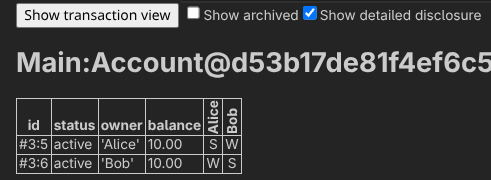
This will open the table view, displaying all active contracts, and archived contracts if you check “Show archived”. Alice’s account has Alice as the signatory (S) and Bob as a witness (W), and Bob’s account has Bob as the signatory (S) and Alice as a witness (W). Ideally, we would preserve privacy by not disclosing each user’s account details to the other. The problem is that Accept fetches both accounts. Since Alice is an observer and Bob is a signatory, when they exercise Accept, both accounts become disclosed to both parties.
If you press “Show transaction view”, you can see all transactions performed during the script execution. This view also lets you see which transactions were disclosed to which parties. If you inspect TX 3, you should see something like the following:
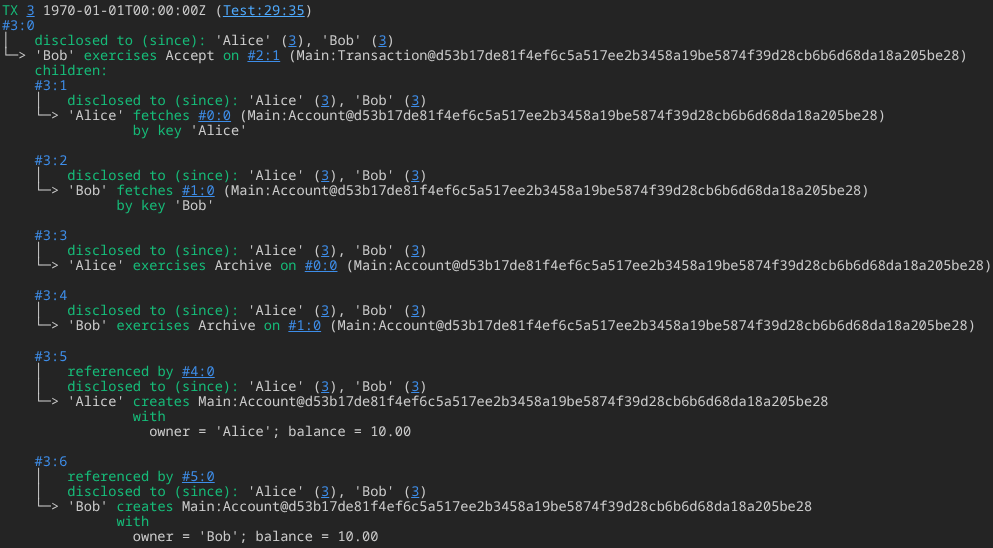
You might see that both Alice’s and Bob’s account were disclosed to each other. For example, in #3:5 and #3:6, we see that Alice and Bob create new accounts for themselves, which get disclosed to both of them.
If this disclosure is acceptable for your use case, you could stop here. However, one of Daml’s core goals is to ensure data is disclosed only to the parties that need it, so for this use case we should treat the disclosure as a bug and fix it.
To elaborate, an observer is a stakeholder: they see contract creation and contract archival (consuming exercises), but not non-consuming exercises or fetches, unless they are explictly among the actors or choice observers of that action. A witness (immediate divulgence), indicated with a W, is a non-stakeholder who sees the creation of a contract because it is a consequence of an action they are an informee of. Divulgence (retroactive divulgence), indicated with a D and not shown here, is a form of disclosure to a non-stakeholder who sees a preexisting contract that was used as input (fetched or exercised) in a transaction they witnessed. A witness sees new contracts created as a side effect of a transaction; divulgence exposes preexisting contracts that were used as inputs.
Third Time’s the Charm: The Propose-Accept Pattern
To resolve the issue, we need deeper changes to the architecture. We’ll introduce a third template representing a central bank entity: a trusted party that controls accounts and processes transactions.
When a contract is fetched, any party participating in the transaction can see it. As a result, if Alice participates in a transaction that fetches Bob’s account (or vice versa), disclosure is unavoidable under this design.
In Solidity, there is a single global state machine that checks msg.sender authorization, with the transaction itself as the unit of authorization. In Daml and Canton, authorization is attached to parties and enforced at the protocol level, and transaction submission is typically performed by an application acting on behalf of those parties. When a template is created, controllers are authorized in advance by the signatories to exercise the choices. Let’s have the bank perform transactions on behalf of the parties. To do this, we’ll set the bank as the signatory of the accounts and transactions.
We’ll use the propose-accept pattern, a standard idiom in Daml. It is analogous to a multisig pattern in Solidity, where two parties must sign off to indicate mutual agreement. Typically, one party proposes an action, and the other can accept or reject it.
Let’s see this in practice. Start by adding a Bank template that acts as the trusted intermediary:
template Bank
  with
    admin : Party
  where
    signatory admin
Since accounts are managed by the bank, it needs to be the signatory. Replace the Account template with:
template Account
  with
    owner : Party
    balance : Balance
    bank : Party
  where
    signatory bank
    observer owner

    key (bank, owner) : (Party, Party)
    maintainer key._1
The owner becomes an observer. Since the maintainer of a key must be a signatory, we use (bank, owner) as the key and use its first field (bank, accessed as key._1) as the maintainer.
We could keep Deposit and Withdraw, but I’ll replace them with Credit and Debit, controlled by the bank:
    choice Credit : ContractId Account
      with
        amount : Balance
      controller bank
      do
        assertMsg "Non-positive amount" (amount > 0.00)
        create this with
          balance = balance + amount

    choice Debit : ContractId Account
      with
        amount : Balance
      controller bank
      do
        assertMsg "Non-positive amount" (amount > 0.00)
        assertMsg "Insufficient balance" (amount <= balance)
        create this with
          balance = balance - amount
The logic is unchanged; only the names and controller differ. If you want to keep Deposit and Withdraw, you can add them back as wrappers. This is left as an exercise.
Now change the Transaction template. We will use the propose-accept pattern, so Transaction represents a proposed transfer awaiting a response. First define a status type:
data TransactionStatus
  = Pending
  | Accepted
  | Rejected
  deriving (Eq, Show)
This declares a sum type. It is similar to a Solidity enum: a TransactionStatus value is one of Pending, Accepted, or Rejected. deriving (Eq, Show) enables equality (==, /=) and conversion to Text via show. It is loosely analogous to:
// == and != are implicit in Solidity
enum TransactionStatus {
  Pending,
  Accepted,
  Rejected
}

function show(TransactionStatus ts) public pure returns (string memory) {
  if (ts == TransactionStatus.Pending) { return "Pending"; }
  if (ts == TransactionStatus.Accepted) { return "Accepted"; }
  if (ts == TransactionStatus.Rejected) { return "Rejected"; }
  revert "Invalid TransactionStatus";
}
If you’ve used Rust (for example, for Solana development), TransactionStatus is similar to a Rust enum, and Eq and Show correspond roughly to Rust’s Eq and Debug traits (called type classes in Haskell and Daml). deriving (Eq, Show) is similar to Rust’s #[derive(Eq, Debug)] (Haskell and Daml do not have a PartialEq analogue).
With that in place, redefine Transaction:
template Transaction
  with
    bank, from, to : Party
    amount : Balance
    status : TransactionStatus
  where
    signatory bank
    observer from, to

    ensure amount > 0.00

    choice Accept : ContractId Transaction
      controller to
      do
        assertMsg "Transaction is not pending" (status == Pending)
        create this with status = Accepted

    choice Cancel : ContractId Transaction
      controller from
      do
        assertMsg "Transaction is not pending" (status == Pending)
        create this with status = Rejected

    choice Reject : ContractId Transaction
      controller to
      do
        assertMsg "Transaction is not pending" (status == Pending)
        create this with status = Rejected
The bank is the signatory, and the choices simply change the status from Pending to Accepted or Rejected. Note that Cancel and Reject differ only by controller: Cancel is for from (if they change their mind), and Reject is for to. Using controller from, to would require joint authorization, so separate choices are needed.
There is some repetition in these choices. If you want, you can factor it into a helper function at top level:
newTransactionStatus : Transaction -> TransactionStatus -> Update (ContractId Transaction)
newTransactionStatus transaction status = do
  assertMsg "Transaction is not pending" (transaction.status == Pending)
  create transaction with status
Choices can omit Update as syntax sugar, but functions cannot, so it appears explicitly here. You can then call newTransactionStatus this Accepted or newTransactionStatus this Rejected in the choices.
Now rewrite Transfer on Account:
    choice Transfer : (ContractId Account, ContractId Transaction)
      with
        receiver : Party
        amount : Balance
      controller owner
      do
        assertMsg "Insufficient balance" (amount <= balance)
        -- Lock funds until the transaction is accepted by the receiver
        -- or rejected by either party.
        this' <- create this with
          balance = balance - amount
        tx <- create Transaction with
          bank
          from = owner
          to = receiver
          amount
          status = Pending
        pure (this', tx)
This debits the amount from the sender’s balance and creates a pending transaction, returning both contracts. This effectively locks the funds. We could model this so that the sender is only debited when the transaction is processed, but pre-locking keeps the flow simpler here.
The workflow is: the sender creates a transaction, the receiver accepts (or rejects, or the sender cancels), and the bank observes the outcome and processes the transaction.
Now add a choice to process the transaction. We should fetch the transaction, archive it to avoid double-processing, and then either credit the receiver (if accepted) or refund the sender (if rejected). Add this to Bank:
    nonconsuming choice ProcessTransaction : (ContractId Account, ContractId Account)
      with
        transactionId : ContractId Transaction
      controller admin
      do
        transaction <- fetch transactionId
        archive transactionId

        (fromId, _fromAccount) <- fetchByKey @Account (admin, transaction.from)
        (toId, _toAccount) <- fetchByKey @Account (admin, transaction.to)

        case transaction.status of
          Pending -> abort "Cannot process a pending transaction"
          Accepted -> do
            -- The funds were locked in the sender's account; credit the receiver.
            toId' <- exercise toId Credit with amount = transaction.amount
            pure (fromId, toId')
          Rejected -> do
            -- The funds were locked in the sender's account; refund the sender.
            fromId' <- exercise fromId Credit with amount = transaction.amount
            pure (fromId', toId)
The choice is non-consuming because we don’t want to archive the bank itself when processing a transaction.
That’s it. Update the test to confirm the new workflow:
testTransfer : Script ()
testTransfer = script do
  admin <- allocatePartyByHint (PartyIdHint "admin")
  alice <- allocatePartyByHint (PartyIdHint "Alice")
  bob <- allocatePartyByHint (PartyIdHint "Bob")
  adminId <- validateUserId "admin"
  aliceId <- validateUserId "alice"
  bobId <- validateUserId "bob"
  createUser (User adminId (Some admin)) [CanActAs admin]
  createUser (User aliceId (Some alice)) [CanActAs alice]
  createUser (User bobId (Some bob)) [CanActAs bob]

  bank <- submit admin do
    createCmd Bank with
      admin

  aliceAccount <- submit admin do
    createCmd Account with
      owner = alice
      balance = 20.00
      bank = admin
  bobAccount <- submit admin do
    createCmd Account with
      owner = bob
      balance = 0.00
      bank = admin

  (aliceAccount', transactionId) <- submit alice do
    exerciseCmd aliceAccount Transfer with
      receiver = bob
      amount = 10.00
  transactionId' <- submit bob do
    exerciseCmd transactionId Accept

  (aliceAccount'', bobAccount') <- submit admin do
    exerciseCmd bank ProcessTransaction with
      transactionId = transactionId'

  aliceBalance <- submit alice do
    exerciseCmd aliceAccount' ViewBalance
  bobBalance <- submit bob do
    exerciseCmd bobAccount' ViewBalance

  assertMsg "Alice should have 10 dollars" (aliceBalance == 10.00)
  assertMsg "Bob should have 10 dollars" (bobBalance == 10.00)
The flow is similar to before. We allocate a party to represent the bank, create the bank contract, and use it to create Alice’s and Bob’s accounts. Alice proposes a $10 transaction to Bob, which Bob accepts. The bank then processes the accepted transaction, crediting Bob’s account. Both end with $10.
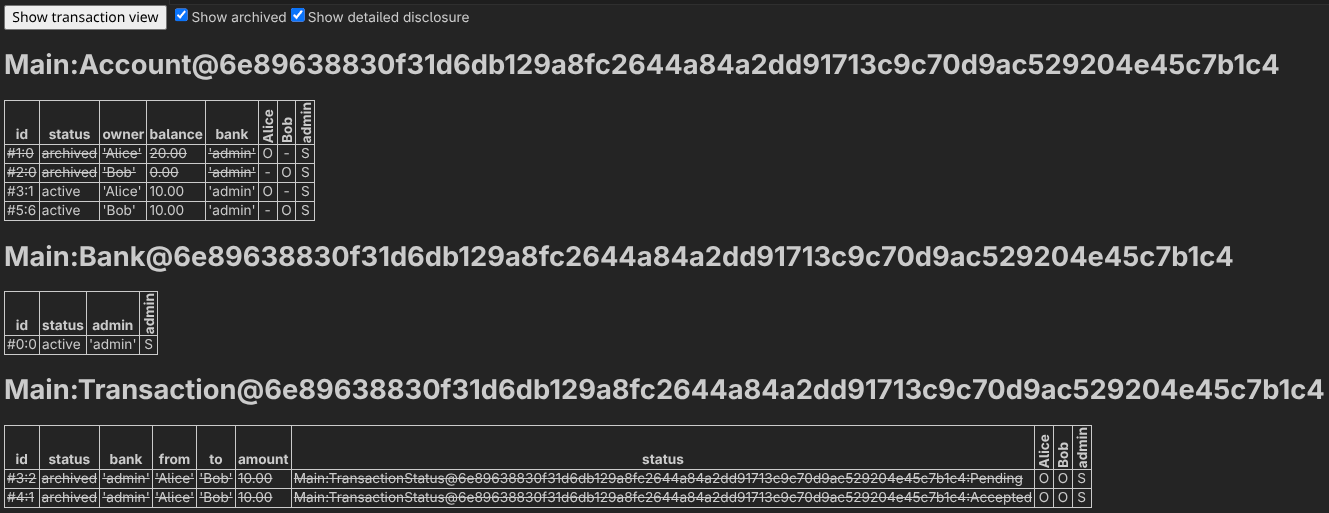
If you look at the table view in the script results, you’ll see that Alice’s and Bob’s accounts are never disclosed to each other, only to the bank and to the owner as an observer:
Daml applications should be tested frequently. As an exercise, try writing tests where Alice cancels a transaction and Bob rejects it, and observe that neither party sees the other’s account.
You might also want to write negative tests, for example checking that a transaction can’t be processed twice, or that the bank cannot process a pending transaction. You might find submitMustFail useful here: it is like submit, but it asserts that the submission failed. To avoid repeating setup code, you might want to create a helper function that sets up parties and contracts and call it before each test.
For more on the available functions, data types, and libraries in Daml, see: API Reference - Canton Network Docs.
Deploying to a Local Canton Network
So far, we’ve used Daml scripts to test and interact with the bank application. Another option is to deploy the contract to a local node (a sandbox) and interact with it using the Canton console, JSON API, or gRPC. You can start a local sandbox and upload the bank contract to it using dpm sandbox. Assuming you used the default project name:
dpm sandbox --dar main/.daml/dist/daml-bank-main-0.0.1.dar
After some time, it should begin listening on port 6865 (gRPC) by default. The HTTP JSON API isn’t enabled by default unless you pass --json-api-port PORT explicitly. If needed, you can find the DAR path with find . -name '*.dar' in the project directory.
From another terminal, you can interact with it via dpm script. For example, modify testTransfer to log Alice’s and Bob’s balances:
   aliceBalance <- submit alice do
     exerciseCmd aliceAccount' ViewBalance
   bobBalance <- submit bob do
     exerciseCmd bobAccount' ViewBalance

+  debug ("Alice's balance: " <> show aliceBalance)
+  debug ("Bob's balance: " <> show bobBalance)
+
   assertMsg "Alice should have 10 dollars" (aliceBalance == 10.00)
   assertMsg "Bob should have 10 dollars" (bobBalance == 10.00)
Then compile the test scripts as a DAR and run the script:
dpm build --package-root test
dpm script --ledger-host localhost --ledger-port 6865 --dar test/.daml/dist/daml-bank-test-0.0.1.dar --script-name Test:testTransfer
You may then see output like:
Jun 17, 2026 12:35:16 PM io.grpc.netty.shaded.io.grpc.netty.TcpMetrics loadEpollInfo
INFO: Epoll available during static init of TcpMetrics:true
[DA.Internal.Prelude:557]: \"Alice's balance: 10.0\"
[DA.Internal.Prelude:557]: \"Bob's balance: 10.0\"
Test:testTransfer SUCCESS
[INFO] [06/17/2026 12:35:20.681] [RunnerMain-pekko.actor.default-dispatcher-8] [CoordinatedShutdown(pekko://RunnerMain)] Running CoordinatedShutdown with reason [ActorSystemTerminateReason]
This is not limited to tests. You can write your own scripts as needed.
We won’t cover the JSON API in this tutorial, but interested readers can check the official docs: https://docs.canton.network/appdev/quickstart/json-api.
You can find the full source code for this tutorial in https://github.com/serokell/daml-bank-blog-tutorial.
Conclusion
In this article, we explained what the Canton network is and why it might be a good fit for your next project. We covered the smart contract language for Canton, Daml, and how it works through a hands-on tutorial. We compared Daml to Solidity, built a simple banking contract, and deployed it to a local sandbox. While this only scratches the surface, it should be enough to get a feel for the model and for the kinds of problems it addresses.
As next steps, you may want to deepen your understanding of Canton and Daml. The Canton docs include a page where you can choose a learning path: https://docs.canton.network/appdev/get-started/choose-your-path.
How Serokell Can Support Your Daml/Canton Project
If you are planning to build on Daml or Canton, Serokell can help you move from early technical discovery to production-ready implementation.
We are a software development agency with deep expertise in functional programming, distributed systems, blockchain engineering, and production-grade financial technology. Our team has broad experience with Daml and Haskell, which allows us to support both the application layer and the deeper architectural decisions behind complex Daml/Canton Network systems.
Our Daml and Canton services include:
Core engineering services
- Daml smart contract and application development
- Canton Network and node integration
- Cross-chain and cross-network application development
- Backend, API, and frontend development for DAML applications
- Production deployment, infrastructure, and DevOps
Architecture, security, and performance
- Daml smart contract and solution architecture audits
- Daml code and architecture quality review
- Best practices assessment
- Production readiness and infrastructure audits
Protocol and ecosystem engineering
- Developer tooling for Daml and Canton Network
- Compiler and language tooling development
- Open-source ecosystem contributions and maintenance
Consulting and enablement
- Daml/Canton Network architecture consulting and technical discovery
- Proof-of-concept and MVP development
- Technical due diligence for Daml-based products
- Team augmentation with Daml, Haskell, and distributed-systems engineers
- Developer onboarding, workshops, and training
- Ongoing maintenance and production support
Whether you need to validate an idea, review an existing architecture, build a production application, or strengthen your team with experienced Daml and Haskell engineers, we would be happy to help.
Drop us a message at hi@serokell.io.


.jpg)
.jpg)